Dashboard Wireframer
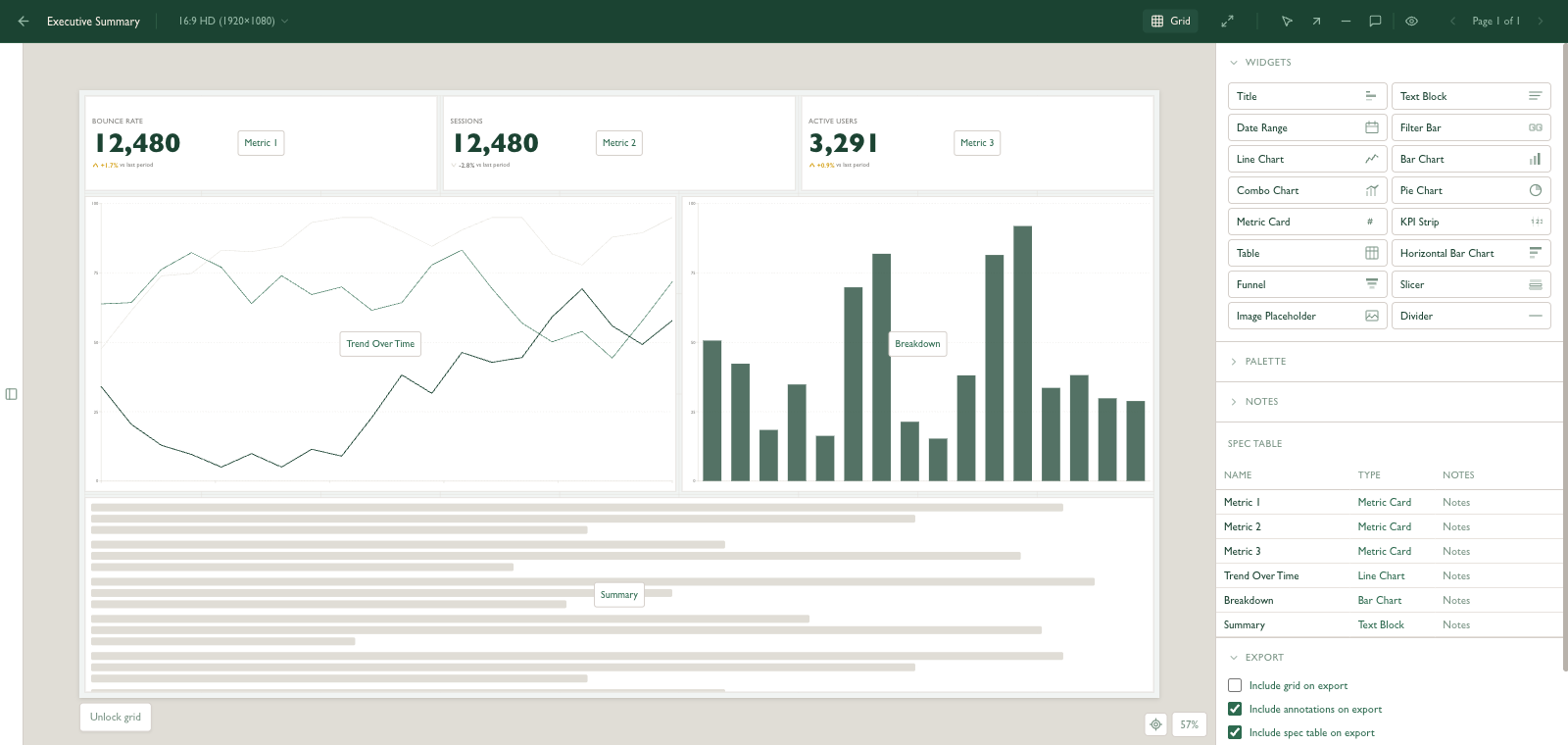
Dashboard Wireframer is a dashboard wireframing tool I built for quickly sketching a dashboard or report layout without having to open Power BI, Looker Studio, Google Data Studio, or any other place where you'll end up building it.
A lot of my client work is dashboards and measurement. Every build starts the same way: connect the data, understand the joins, build a model, generate a few sample visuals. By the time you can see anything on the page you've already built most of the dashboard, so there's no point wireframing it after that.
That's why I built this dashboard wireframer. Big, simple blocks of pre-filled sample data on a grid. It's the step before the build so you can get a feel of what it looks like. You can move the components around until the layout reads properly, export a PNG, and send it over. It's enough to get approval from a client, or to brief whoever is building it, without anyone having to imagine what a box diagram would look like with numbers in it. There's space for detail on each widget too, so when you're doing a handoff, it all comes documented visually.
It also works in presentation layout, so a monthly report can be laid out the same way.
Why wireframe a dashboard before you build it
When I'm scoping a dashboard, or being scoped one, the conversation that matters is about layout. Dashboard tools aren't built for that conversation. Looker Studio, Power BI and Tableau all want a data source, a model and a set of fields before they'll draw a single chart. It's the right way to build a dashboard. It's a slow way to talk about one.
The conversation that matters happens early. What goes top left. Whether the KPIs sit in a strip or as cards. Whether the client needs a date range picker or a fixed month. Whether the funnel belongs on page one or in an appendix. None of those questions need real data to answer, and all of them are cheaper to settle on a sketch than on a half-built report.
In practice I use it two ways. One is client approval: lay out the dashboard, export the PNG, walk through it on a call, take the notes. The other is briefing: when someone else is building the dashboard, the wireframe plus the spec table is most of the brief. Either way, the dashboard tool gets opened once, with the layout already agreed.
How it works
Four steps from blank canvas to a PNG in the client's inbox.
Pick a canvas
Presentation, 16:9, 4:3, a Looker Studio page, a Power BI page, or custom dimensions. The canvas is shared across every page in the dashboard.
Place widgets on the grid
Click a widget type, drop it on the grid, drag to resize. Widgets can't overlap, so the layout stays honest. The grid locks once you start placing.
Name, note and annotate
Name every widget. Add a line of spec so a builder knows what it should do. Add arrows and callouts for anything visual, and pages for multi-page reports. When you hand it off, the intent travels with the layout.
Export and share
Export a pixel-perfect PNG with the layout, annotations and spec table. Or save a project file to pick it up later or hand it to a colleague.
What's in the box
Sixteen widget types
- Title, text block, divider
- Line, bar, horizontal bar, combo, pie
- Metric card, KPI strip, table, funnel
- Date range, filter bar, slicer
- Image placeholder
Content-aware rendering
Widgets adapt to the space they get instead of stretching. Charts drop axis labels when they get small, tables show fewer rows, metric cards scale their number to fit.
Canvas presets
Presentation, 16:9, 4:3, Looker Studio default and Power BI page sizes, or set your own. The wireframe you sign off is the shape you build.
Four-slot colour palette
Primary, secondary, highlight and neutral. Pick a preset or set the client's brand colours and every chart, header and card follows.
Spec table export
Every widget's name, type and notes ship with the PNG as a table under the layout. Handoff arrives documented, so nobody has to guess.
Saved in your browser
Wireframes save locally as you work and nothing is uploaded. Export a project file to keep one, move it to another machine or share it with a colleague.
Questions
Does the Dashboard Wireframer store my wireframes anywhere?
No. Everything is saved in your own browser and nothing is sent to a server. Save a project file if you want to keep a wireframe, move it to another machine, or share it with a colleague. Clearing your browser data will clear your wireframes.
Can I use Dashboard Wireframer for Looker Studio or Power BI layouts?
Yes. Canvas presets match the default page sizes for Looker Studio and Power BI, as well as 16:9 and 4:3 presentation formats, so the wireframe you sign off is the shape you will build.
Does Dashboard Wireframer connect to my data?
No, and that is the point. Every widget carries sensible sample data so you can decide the layout without connecting a source, building a model or waiting for a query.
How do I share a Dashboard Wireframer wireframe with a client?
Export a PNG. It includes the layout, optional annotations and a spec table listing each widget with its notes, so the client sees the layout and the intent on one image. Multi-page dashboards can be exported as a ZIP of PNGs.
Does Dashboard Wireframer work on a phone?
It is built for a desktop browser. The editor needs room for the canvas and side panels, so a laptop or larger screen is recommended.
Give it a go
If you build dashboards or brief people who do, it might save you the same time it saves me. If something's broken or missing, let me know.
Open the wireframer →